top of page

From First Log to Lasting Habit
Background
Phase 1 helped new users complete their first diary entry, but the data showed that many still struggled to build a consistent recording habit.
Phase 2 therefore focused on providing personalized recording guidance based on users’ health conditions and available devices, reducing the decision-making effort required to keep recording.
Discovery


💡 Continued Recording Is Linked to Higher Retention
Phase 1 increased first diary entries, but did not lead to the same growth in continued recording. Further analysis showed that users with 2+ diary entries in their first month reached a 77.14% 1-month retention rate.
Design Assumptions
Based on Phase 1 data and insights from our in-house dietitians about common challenges they observed with new patients, we identified potential barriers to building a consistent recording habit. These assumptions were later validated through usability testing and post-launch performance.
Goal
“Simplify continued recording through personalized guidance.”
Design Approach
➊ Diary Entry Guide – Entry Point
Provide personalized guidance when users are ready to record.
Place the guide at the top of the Add Diary menu, offering personalized recommendations based on users’ health conditions and available devices to reduce the decision-making effort around what and how to record.

➋ Trust-Based Personalized Onboarding
“Turn personalization into a guided, human-centered experience.”
Users provide their health conditions and available devices through a short onboarding flow, allowing the system to tailor recording recommendations to their situation.
A nutritionist character and contextual animations make the process feel like someone is understanding their needs and preparing the guide for them—building trust before presenting the recommendations.
Contextual Motion Design
Make personalization visible through motion.

01|Personal Data
Use simple body cues to communicate that personal health data is being considered.

02|Available Devices
Visualize available measurement devices to show that recommendations adapt to the user’s setup.

03|Personalized Guidance
Use the nutritionist character to convey that the system is reviewing the user’s situation and preparing tailored guidance.
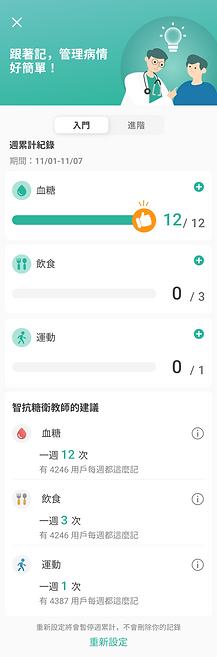

➌ Tiered Goals for Different Recording Needs
”Make it easy for new users to start, while supporting more advanced recording needs.“
Different health conditions and self-management needs require different recording frequencies.
We therefore designed two levels of guidance: Basic and Advanced—lowering the barrier for new users while supporting those with Type 1 diabetes or more established recording habits.
With weekly goals, progress visualization, and health education, users can clearly understand how much to record and why it matters.
Usability Test
After conducting usability testing, we have identified the following priority iterations to implement before the official launch:
Usability Findings & Improvements
💡 See the slides below for the full testing process, user feedback, and design iterations.


.png)

bottom of page